In the forklift and construction machinery sector, products reach customers in two ways: sale or rental. In both models, the real work begins after delivery — commissioning, periodic maintenance, fault response and rental periods. Tracking these with paper, phone calls or Excel creates operational blind spots.
FieldCo enables forklift and construction machinery companies to manage all of these processes digitally, from the field to the head office.
---
First Commissioning: Full Start-Up with a Checklist
When a forklift or construction machine is delivered, the "first commissioning" stage is critical. Hydraulic system, brakes, horn, lighting, load capacity — each must be checked and recorded.
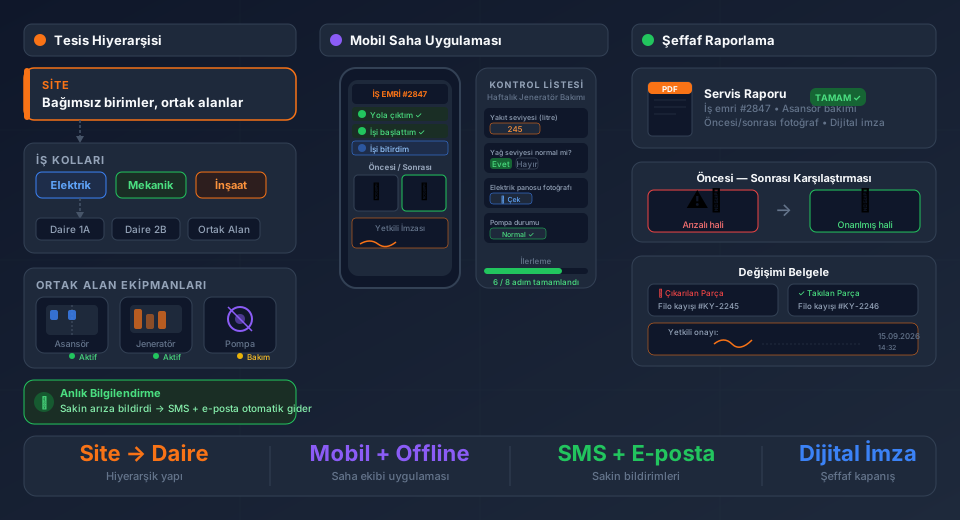
FieldCo's advanced checklist module structures this process:
- A custom question set is defined for each machine type
- Questions can be answered with text, numerical values or photos
- Conditional question logic: sub-questions are triggered based on a previous answer ("Is the brake system faulty?" → If yes, details of the fault are requested)
- Machine images are uploaded to the equipment card; the technician accesses them from the same screen on site
When the commissioning form is complete, it is archived as a PDF and signed off by the customer.
---
Rental Tracking: Which Machine Is Where and When Does It Come Back?
Managing a fleet of rental forklifts or construction machines means knowing which machine is where, who is using it and when the rental period ends. Relying on memory or a calendar reminder carries significant risk.
In FieldCo, for every rental machine:
- Rental start and end dates are recorded on the equipment card
- An automatic email is sent to you as the rental end date approaches
- If the rental is extended, it is updated in the system and the full history remains on record
No machine is left "forgotten" with a customer, and profitability calculations remain transparent.
---
Maintenance and Fault Work Orders: Device History Always Ready
Every sold or rented machine eventually generates maintenance and fault work orders. What problem did the same forklift come in with before, what was done, which part was replaced?
In FieldCo, an equipment card is maintained for every piece of equipment:
- Full service and fault history
- Parts used and intervention notes
- Machine photos and technical images
- Warranty and contract information
Before going to site, the technician can review the full history of that machine in the mobile app.
---
OHS Documents: Personnel Files Accessible at Any Time
Keeping OHS documents current for forklift and construction machine operators is both a legal requirement and critical for workplace safety.
In FieldCo, each member of staff has a document upload folder. The operator's forklift licence, occupational safety training certificate and medical examination results are uploaded here. When an inspection or customer request comes in, the documents can be produced within seconds.
---
Powerful Mobile App: Intuitive, Fast, Offline
Forklift and construction machinery technicians often work in environments with poor internet connectivity — inside factories, at ports, on construction sites or in warehouses. FieldCo's Android app works fully offline in these environments; work orders are opened, forms are filled in and photos are added. All data automatically syncs when connectivity is restored.
Thanks to the app's intuitive design, technicians adapt to the system quickly — no lengthy training required.
---
Conclusion
Commissioning checklists, rental tracking, maintenance work orders, device history and OHS document management for forklift and construction machinery companies — all on one platform with FieldCo. Your field team always has a powerful, intuitive mobile assistant by their side.
---
Frequently Asked Questions
How do I receive an alert when a rental period is about to end?
The rental end date is recorded on the equipment card in FieldCo. An automatic email is sent to you before the period expires.
Can photos be added to the commissioning checklist?
Yes. A photo can be added to each question. General images of the machine are also uploaded to the equipment card and kept on record.
Where are staff OHS documents stored?
Each member of staff has a document upload area in FieldCo. Certificates, training documents and medical examination results are uploaded here and can be accessed instantly when needed.
Which devices support offline use?
FieldCo's offline mode is fully supported on Android devices. In areas without a signal, work orders can be opened, forms filled in and photos added; everything syncs automatically when connectivity is restored.
Field service management software guide: rental tracking, checklists, mobile field management →
MÇ
Metin Çelik
Founder & CEO — FieldCo / MOBIM Software
Metin Çelik founded MOBIM Software in 2002 and has spent 24 years in field service management, helping 350+ companies digitalise their field operations.