If you provide post-construction maintenance, mechanical, electrical, furniture or HVAC service to brands with dozens or hundreds of sites across Turkey, you know the coordination problem well:
- Which store has which equipment?
- Did Istanbul Şişli's air conditioner break down, or Kadıköy's POS system?
- Did the technician actually go to that address, and how long did they work?
- How does the customer track the quality of service they receive from you?
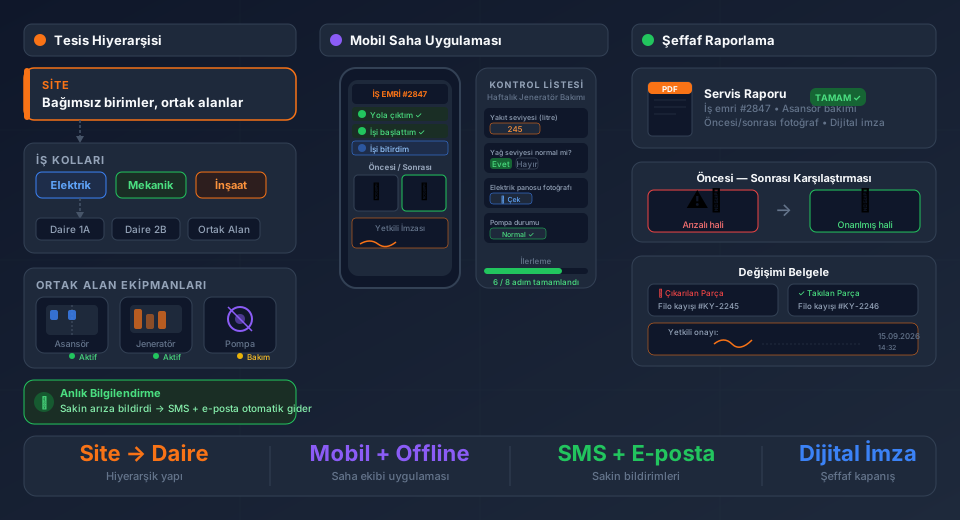
FieldCo solves all of these questions in a single digital platform. Here is how it works, step by step:
---
1. Location and Asset Definition: "Which Store, Which Equipment?"
Every location of the customer brand is added as a separate card: 12 stores in Istanbul, 8 restaurants in Ankara, 5 warehouses in Izmir. Equipment inside each location is defined at any depth you choose:
- For a clothing store: fitting room door, cashier POS, AC unit, display lighting panel
- For a restaurant: grill, oven, refrigerator, ventilation unit — averaging 50–60 items per location
Each asset is recorded with its serial number. So "which of the 3 side cabinets has the problem?" is no longer guesswork — it is a precise answer by serial number.
You can start with just 4–5 core items and expand over time.
---
2. Work Order Management: The Right Person, at the Right Time
Store staff opens the app, selects their location, scans the equipment or finds it in the list, and reports the fault. Everything after that is automatic:
Routing by fault type. A furniture fault goes to the furniture team; an electrical fault goes to the electrical crew. Nothing reaches the wrong person.
Sub-contractor / third-party flow. If you have a dedicated sub-contractor for Ankara stores, the system knows this. Work orders either pass through central approval before being assigned to the sub-contractor, or you define a direct auto-assignment rule: "Ankara sub-contractor is Company X." No central approval needed — the work order goes directly to the relevant party.
---
3. Field Staff Tracking: Real Working Time, Real Data
Once the job is assigned, the field worker receives a push notification. Time logging begins:
1. "I've Departed" button → travel time starts being measured
2. "Work Started" button → actual working time is measured
3. Waiting periods in between are logged separately
The result: "This technician spent X minutes travelling to this location, worked Y minutes, waited Z minutes." Not an estimate — real data.
---
4. Checklists: "Did the Job" vs. "Proved the Job"
FieldCo's checklist engine goes far beyond standard forms:
Conditional questions. If "Is the equipment running?" is answered "No," the "What is the fault code?" question automatically appears. Irrelevant questions are hidden; relevant ones are triggered.
Value range validation. The "What is the cooling temperature?" question can require an entry between –5°C and +5°C. Any value outside this range triggers an instant alert and is flagged in the report.
Photo proof. The technician must take a photo at required steps. Uploading an old photo from the gallery is impossible; photos are taken in real time, automatically timestamped and — on supported devices — geo-tagged.
---
5. Approval and Closure: "No Signature, No Close"
When the job is complete, the technician collects the digital signature of the store or restaurant manager through the system. If a "cannot be closed without central approval" rule is added, the technician cannot leave the location until all steps are complete.
This mechanism is especially critical in corporate contracts: it eliminates the possibility of leaving incomplete work, and customer complaints are minimized.
---
6. Customer Portal: Transparency Without Control
The brand you serve (clothing chain, restaurant group, etc.) sees only the work orders for their own locations through a dedicated portal:
- Work order status: open, assigned, completed?
- Working time logs and travel durations
- All photos taken
- PDF of the completed form (downloadable from the portal, also automatically emailed on job completion)
The customer sees everything "read-only" — they cannot modify data, but they can monitor the quality of every service in full detail. This transparency builds trust and eliminates "what exactly did you do?" disputes.
---
Who Is This For?
This model is designed for companies serving the following types of clients:
| Service Provider | Client Type |
|---|---|
| Mechanical / HVAC service | Fast-food chain, hotel group |
| Electrical & lighting maintenance | Clothing retail, shopping center |
| Furniture installation & maintenance | Furniture chain, office fit-out |
| Post-construction technical maintenance | Residential management, industrial facility |
| Security system installation | Bank branches, supermarket chain |
---
How to Get Started
Setting up a multi-location customer structure in FieldCo typically takes 1–2 days. We import your existing customer and location list from Excel, build asset templates together, and configure approval workflows.
You can test it with your own customer locations during the 14-day free trial.
Learn more about FieldCo Field Service Software →
MÇ
Metin Çelik
Founder & CEO — FieldCo / MOBIM Software
Metin Çelik founded MOBIM Software in 2002 and has spent 24 years in field service management, helping 350+ companies digitalise their field operations.