What comes to mind when you think of facility management?
Probably a site with hundreds of units, its elevators, generators, irrigation system, electrical panels… and a team responsible for maintaining all of it. Every fault report they receive, every routine inspection they carry out, every part they replace — all of it needs to be recorded somewhere. Or it doesn't get recorded at all.
The biggest problem here is information scattered everywhere. One resident sends a WhatsApp message, another calls, another comes to the door. The technician arrives on site with no knowledge of previous services. "What was done last time?" often gets answered with "I don't know, it was someone else."
FieldCo solves this by bringing both the facility structure and work processes under one roof.
---
How Is the Site Structure Defined?
Facility management in FieldCo starts with a hierarchical structure.
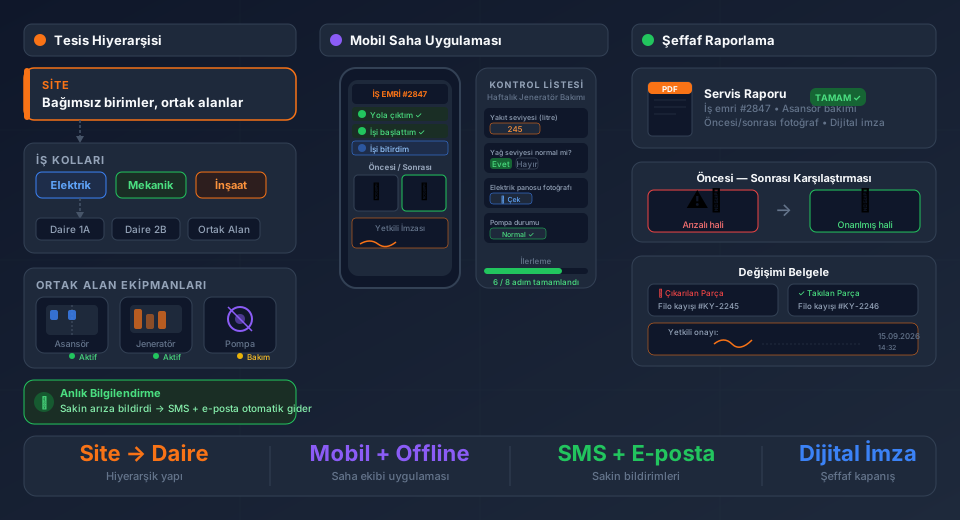
At the top is the site. Within a site you can define dozens or even hundreds of independent units — apartments, offices, shops. Each unit's owner or occupant is in the system, so when a fault report comes in you don't need to ask whose unit it is.
Common areas are defined as a separate branch. Machine room, rooftop, car park, garden — all of these go into the system under a "common areas" heading.
Under each site, work categories are opened: electrical, mechanical, civil, and so on. This means when a work order comes in, it's clear from the start which team handles it.
---
How Are Equipment Items Defined?
All devices in common areas — elevators, generators, air handling units, pumps — are defined in the system as products.
Each product accumulates its complete service history. Which technician went when, what they did, which part they replaced — all there. The next technician can check this history on their phone before heading to site.
Residents are part of this system too. When a resident reports "the elevator is broken", SMS and email notifications linked to that work order can be triggered automatically:
- "Your report has been received, our team is being directed."
- "Our technician is on the way."
- "The fault has been resolved."
The resident doesn't need to call anyone. The process moves forward on its own and the resident is kept informed in real time.
---
Field Teams Work Entirely on Mobile
When a field technician starts work, their phone is everything.
The work order is assigned to them, and they move the process forward step by step in the mobile app:
"On my way" → The system logs the time, the manager is notified.
"Started work" → Working hours begin.
When the job is done, before and after photos are added. This step is critical: "what I found, what I did, how it looks now" stays visually documented. Parts removed, parts installed — all captured in photos.
---
Checklists: The Digital Version of Daily and Weekly Inspections
Facility management has its routines. Things that need checking every morning, things that need attention once a week, monthly inspections.
FieldCo's checklists are built exactly for these routines.
The technician opens the list and works through each question in order. Questions can be different types:
- Numerical value: "What is the generator fuel level in litres?" → The technician enters the number.
- Yes/No: "Is the emergency exit lighting working?"
- Photo: "Photograph the current state of the electrical panel."
- List selection: "Pump status: Normal / Running noisily / Not running"
This structure works for both daily routine inspections and special audit visits. When an auditor visits the site, they can pull up all the checks completed up to that day, the values entered and the photos taken.
---
At Job Completion: Signature and Transparent Closure
One of the most common problems in facility management is this: "We did that job, but we have no proof."
In FieldCo, a work order closes with a digital signature from the manager or authorised person. That signature means "I've seen the work, I approve it."
The before/after photos, the record of replaced parts, the description of work done — all of this can be exported as a PDF report. The unit owner is left with no "was it actually done?" doubt. There's documentation, photos, a signature.
This transparency protects the facility management company and builds residents' trust.
---
Summary: What Changes in Facility Management?
| Before | With FieldCo |
|--------|-------------|
| WhatsApp, phone calls, paper | Single platform, everything recorded |
| "Who did it, when?" unknown | Complete service history visible instantly |
| Routine checks missed | Checklists with automatic reminders |
| Resident calls for updates | Automatic SMS/email notifications |
| "Was it really done?" doubt | Photos, signature, PDF report |
Technical facility management involves hundreds of variables. Managing them with paper and phone calls is possible — but errors, delays and communication breakdowns become inevitable.
What changes when you build a digital system? The team focuses on work, management looks at reports, residents receive notifications.
What is field service management software? Read our complete guide →
Try FieldCo free for 14 days →
MÇ
Metin Çelik
Founder & CEO — FieldCo / MOBIM Software
Metin Çelik founded MOBIM Software in 2002 and has spent 24 years in field service management, helping 350+ companies digitalise their field operations.