CNC machine and lathe service is one of FieldCo's most established reference sectors. In this sector, service is never just "product broke, product fixed." Faults can be complex, repairs often span multiple days, and labour cost is always calculated by the hour.
FieldCo is built around these realities, bringing together several critical features specifically for CNC service operations.
---
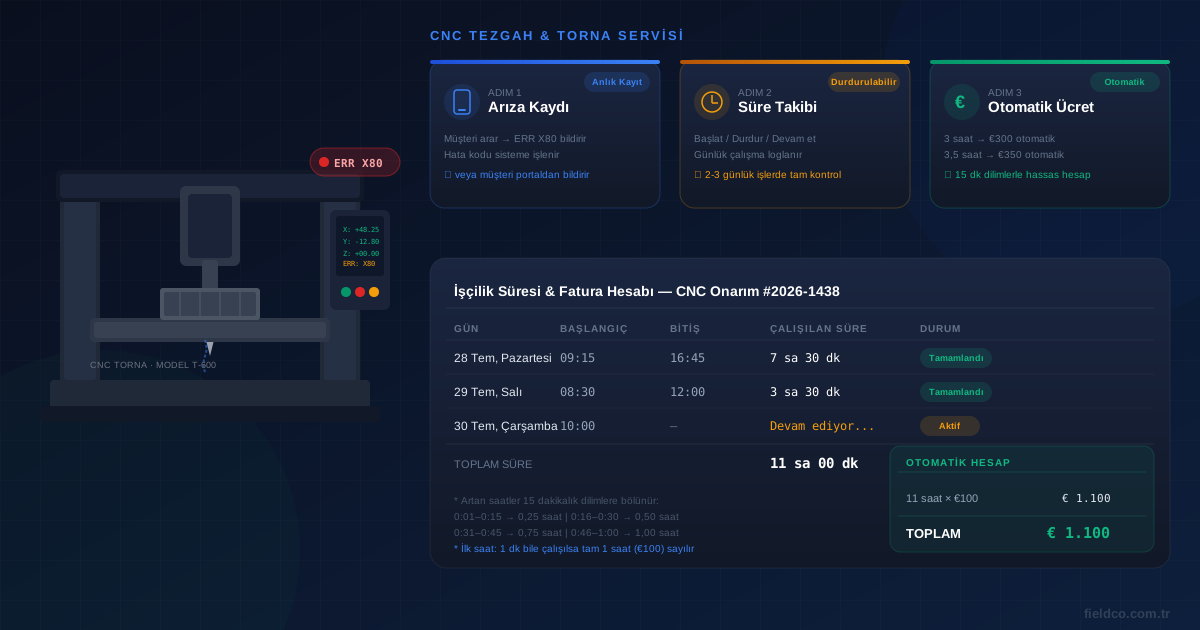
1. Fault Logging: Customer Calls, Error Code Enters the System
The process typically starts with a phone call. The customer contacts the service team and reports the error code shown on their machine — for example, an *X80 axis deviation fault*. The service agent logs this in FieldCo: error code, machine details, fault description, and the customer contact are all recorded.
Alternatively, a corporate user account can be created for the customer. In this case, the customer creates the fault report directly in FieldCo instead of calling. For large factories or businesses with multiple machines, this eliminates back-and-forth phone calls and ensures all information is entered completely and accurately.
---
2. Pausable Time Tracking
CNC repairs take time. A machine is inspected today, a spare part arrives tomorrow, the repair is completed the day after. How many hours were actually worked across those three days?
In FieldCo, the technician starts the timer when they open the work order. They stop it at the end of the day or when they need to leave. The next day, they resume. The system logs each session independently:
| Day | Start | End | Duration |
|-----|-------|-----|----------|
| Mon 28 Jul | 09:15 | 16:45 | 7 h 30 min |
| Tue 29 Jul | 08:30 | 12:00 | 3 h 30 min |
| Wed 30 Jul | 10:00 | 13:15 | 3 h 15 min |
Total: 14 hours 15 minutes — calculated automatically, each day logged separately.
This log appears on both the service form and the customer-facing report. "How many hours did you work?" is no longer a contested question — it's answered by the system, backed by timestamped data.
---
3. Automatic Labour Cost Calculation
Billing in CNC service typically follows this rule:
- First hour: Even a single minute of service counts as a full hour.
- Additional hours: Each extra hour is also billed in full; however, partial hours are split into 15-minute increments.
FieldCo applies this rule directly to the work order billing structure. If a customer pays €100 per hour:
| Time Worked | Calculation | Invoice |
|-------------|-------------|---------|
| 0:01 – 1:00 | 1 full hour | € 100 |
| 3:00 exactly | 3 hours | € 300 |
| 3:30 | 3 h + 0.5 h (30 min = 2 × 15 min) | € 350 |
| 3:15 | 3 h + 0.25 h (15 min = 1 × 15 min) | € 325 |
| 3:45 | 3 h + 0.75 h (45 min = 3 × 15 min) | € 375 |
When the technician enters the working time, the invoice amount is calculated automatically. The currency (TL, EUR, USD) is set at the work order level. No manual calculation required.
---
Why Does the 15-Minute Increment Matter?
CNC repair sessions don't always end on the hour. Instead of the ambiguous question "I worked 3 hours and 20 minutes — what do I enter?", FieldCo applies a clear rule:
- 1 – 15 minutes → 0.25 hour
- 16 – 30 minutes → 0.50 hour
- 31 – 45 minutes → 0.75 hour
- 46 – 60 minutes → 1.00 hour
This removes any ambiguity for the technician and prevents disputes about labour charges before they ever start.
---
What Appears on the Service Form?
When the work order is complete, the digital service form sent to the customer includes:
- Fault description and error code
- Daily work log table (day / start / end / duration)
- Total hours worked
- Billing rule and automatically calculated amount
- Customer digital approval signature
Once the customer approves the form, the service is closed and the billing information is recorded in the system.
---
Frequently Asked Questions
Can I pause and resume the timer multiple times?
Yes. You can open as many sessions as needed on a single work order, starting and stopping each independently. The system logs all sessions and calculates the total.
Can I change the first-hour rule?
Yes. The first-hour rate, additional-hour rate, and increment rule can all be configured per work order or per customer.
Which currencies are supported?
FieldCo supports TL, USD, EUR, and other currencies. The currency is set at the customer or work order level.
Can the customer see the daily time log?
Yes. The digital form sent to the customer clearly shows the daily session log and the total hours worked.
Explore FieldCo features and pricing →
MÇ
Metin Çelik
Founder & CEO — FieldCo / MOBIM Software
Metin Çelik founded MOBIM Software in 2002 and has spent 24 years in field service management, helping 350+ companies digitalise their field operations.