Why Paper Work Orders No Longer Cut It
The majority of field service companies still operate with paper-based work orders. This brings a series of critical problems:
- Lost documents: A form sent to the field may never return to the office — or come back illegible.
- Delayed data entry: Forms filled in evening sessions update customer records too late.
- Errors: Handwritten device codes, part numbers, and service notes can be misread.
- Zero manager visibility: Which technician is on which job, at what stage — no real-time information.
- Customer complaints: "Your technician came but I don't know what they did" becomes a common refrain.
---
How Digital Work Orders Work
#
Call Intake and Work Order Creation
A customer submits a request via call center, WhatsApp, email, or the customer portal. The system automatically creates a work order and opens the customer card with full service history.
Paper process: Phone → notepad → evening Excel → verbal briefing to technician next morning.
Digital process: Call received → work order created → pushed to technician's mobile app.
#
Technician Assignment
The manager sees unassigned work orders in the Kanban board. They assign by drag-and-drop based on the technician's current workload, location, and expertise. The technician instantly receives a mobile notification.
#
Field Workflow
When a technician arrives at the customer address:
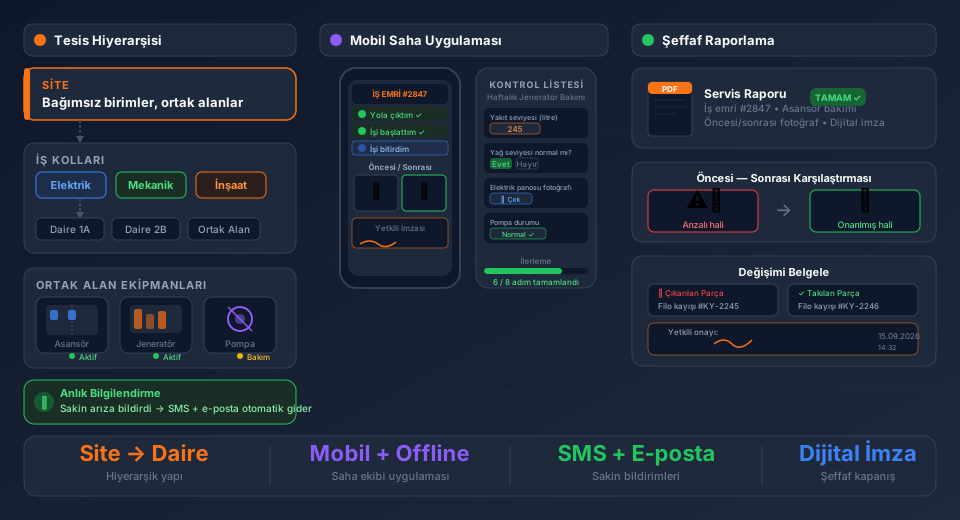
1. Opens the work order in the app — customer info, device model, warranty status, and previous service notes are on screen.
2. Enters the fault diagnosis, actions taken, and parts used.
3. Uploads required photos.
4. Fills in a custom service form (fields specific to the brand or product type).
5. Customer approves via digital signature or SMS code.
6. Work order automatically moves to "Completed" status.
This workflow saves an average of 35 minutes per technician compared to paper-based processes.
---
Custom Service Forms: Why Standard Forms Fall Short
The field requirements for HVAC service differ vastly from medical device service. HVAC needs refrigerant pressure values, fan RPM, and filter status; medical devices require calibration certificate numbers, measurement error margins, and regulatory compliance fields.
FieldCo's Custom Service Form Design module lets you build forms tailored to your needs. With a drag-and-drop form builder, you can arrange text, number, dropdown, photo upload, and signature fields however you like.
---
Warranty Management
One of the most powerful features of digital work orders is automated warranty tracking. The system:
- Stores purchase date and warranty period.
- Shows instantly whether warranty is valid when a work order is opened.
- Sends automatic notifications to customers for out-of-warranty work.
- Presents warranty-covered part replacements in formats ready for manufacturer reporting.
Especially for authorized service networks, this feature creates critical value both operationally and financially.
---
Migration Plan: First 30 Days
| Week | Action |
|------|--------|
| 1 | Import existing customer and device data into the system |
| 2 | Train field team on the mobile app |
| 3 | Run first work orders in parallel (both digital and paper) |
| 4 | Full digital switch — retire paper forms |
FieldCo's Online Training & Onboarding package manages this transition step by step. Most teams are fully comfortable with the system within 3 days — no intensive training required.
For companies that prefer a fully managed, turnkey setup including ERP integration, the entire process is completed within 1–2 weeks. Data migration, integration testing and team training are all included.
---
Conclusion
Moving to paperless work order management is not just a software change — it's a strategic step that increases your company's operational maturity. With the right planning and the right tools, this transition is both fast and lasting.
Work order management with field service software: complete guide →
MÇ
Metin Çelik
Founder & CEO — FieldCo / MOBIM Software
Metin Çelik founded MOBIM Software in 2002 and has spent 24 years in field service management, helping 350+ companies digitalise their field operations.