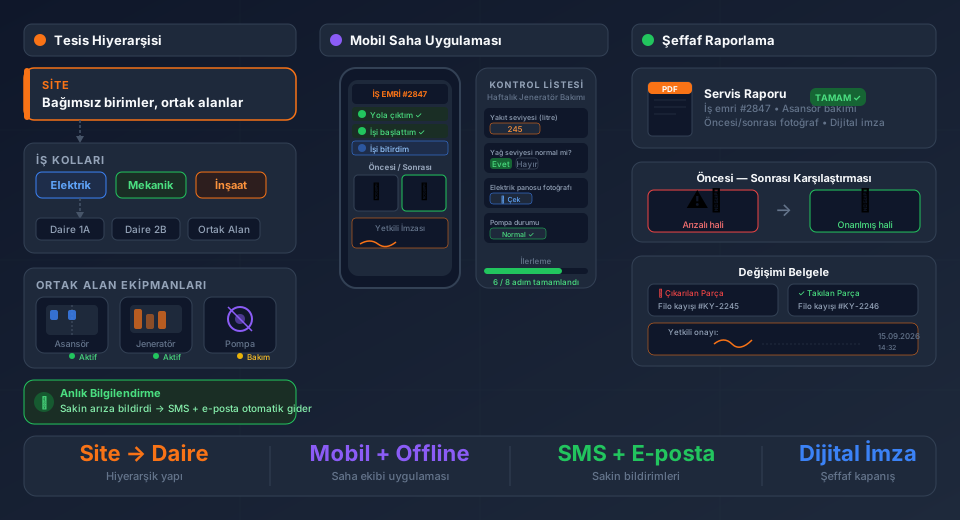
Sliding door systems, turnstiles and access control equipment must operate without interruption in shopping centres, airports, factories and public buildings. For companies that install and maintain this equipment, the sales process is just as critical as fault response: from preparing a quote for a prospect through to an installation work order, and from the first service to an annual maintenance contract, every step needs to be tracked.
FieldCo works with companies in this sector. On the web interface, CRM and field service are managed on the same platform. For field teams, there are two separate mobile apps: the FieldCo field service app and the FieldCo CRM app.
---
CRM Quote Management: From Prospect to Contract
Selling a sliding door or turnstile system typically involves a site survey, a technical specification and multiple quote revisions. Running this process through Excel or email leads to lost information and delayed follow-up.
In FieldCo's web interface, CRM and field service work on the same screen:
- Prospect record and communication history
- Site survey activity and notes
- Quote preparation and revision tracking
- From "deal won" to sales order
When a quote is approved, the system automatically creates an installation work order and assigns it to the field team. The information gap between the sales team and field team disappears.
For the full 360° workflow from first contact to installation: CRM and Field Service Integration: 360° Workflow from First Contact to Installation →
---
Installation Work Order: Every Installation Fully Recorded
Installing a door system or turnstile is not a standard delivery. Site conditions, infrastructure requirements and customer-specific requests differ on every project.
In a FieldCo installation work order:
- Customer location and access information
- List of equipment to be installed (brand, model, serial number)
- Installation checklist (cable connections, mechanical adjustments, commissioning tests)
- Customer e-signed delivery receipt
When installation is complete, the device is automatically added to the customer's equipment list and the warranty process begins.
---
Fault and Maintenance Work Orders: Device History Ready on Site
The real work starts after installation. The same turnstile has failed again — what was done in the previous visit, which part was replaced?
In FieldCo, an equipment card is maintained for every device:
- Full service history
- Parts used and intervention notes
- Warranty date and contract information
- Fault and intervention photos
When the technician opens the work order in the mobile app, the full history of that device is visible. Correct diagnosis, correct part, single visit.
---
Periodic Maintenance Planning: Never Miss a Contract Date
Signing an annual maintenance contract is easy; remembering the contract date on time gets harder. In FieldCo, a periodic maintenance plan is created for each customer. When a maintenance date approaches, you receive an automatic notification, a work order is created and assigned to the field team.
---
Conclusion: CRM at First Contact, Work Order at Installation, Plan for Maintenance — All on One Platform
On the web interface, the entire process from prospect to quote revision, installation work order to annual maintenance is visible on one screen. For field teams, FieldCo and FieldCo CRM are used as two separate mobile apps. To learn more about the CRM module, visit fieldcocrm.com.
---
Frequently Asked Questions
Are CRM and field service in the same system?
On the web interface, yes — quotes, sales and service processes are managed on the same screen. On mobile, FieldCo and FieldCo CRM are two separate apps.
Is the device record created automatically after installation?
Yes. When the installation work order is closed, the installed equipment is added to the customer's device list and the warranty process begins.
How are periodic maintenance contracts tracked?
A maintenance plan is defined in FieldCo. When the date approaches, an automatic notification is sent and a work order is created.
How is device history accessed during a fault call?
When the technician opens the work order in the mobile app, the full service history, parts used and notes for that device are ready to view.
Field service management software guide: CRM integration, installation work orders, periodic maintenance →
MÇ
Metin Çelik
Founder & CEO — FieldCo / MOBIM Software
Metin Çelik founded MOBIM Software in 2002 and has spent 24 years in field service management, helping 350+ companies digitalise their field operations.